
Flow control
Last updated on 2026-03-31 | Edit this page
Estimated time: 90 minutes
Overview
Questions
- How can I do the same operations on many different values?
- How can my programs do different things based on data values?
Objectives
- Explain what a
forloop does. - Correctly write
forloops to repeat simple calculations. - Write conditional statements including
if,elif, andelsebranches. - Correctly evaluate expressions containing
andandor.
Often, we want to perform different operations in our code based upon dynamic conditions. To explore this idea, we are going to pretend we have two sensors. The first represents temperature, and the second represents if there is rainfall or not. Our temperature value is numeric, and the rainfall variable is a boolean. To declare those variables, you can type:
Then place the following code into your script:
Run the script using the run button (little green play button) above the script pane.
From observing the output in the console and from a brief inspection of the code, it should be evident that we are evaluating the variable rainfall. Specifically, we are checking if it is True. If the outcome is of the check is true, then we perform any code within the indented block.
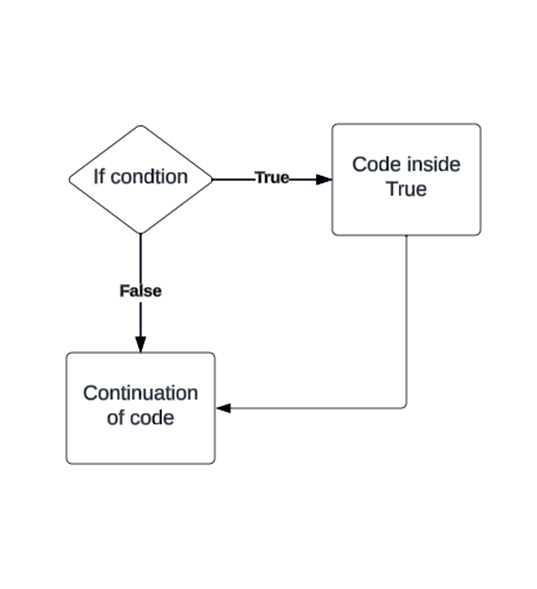
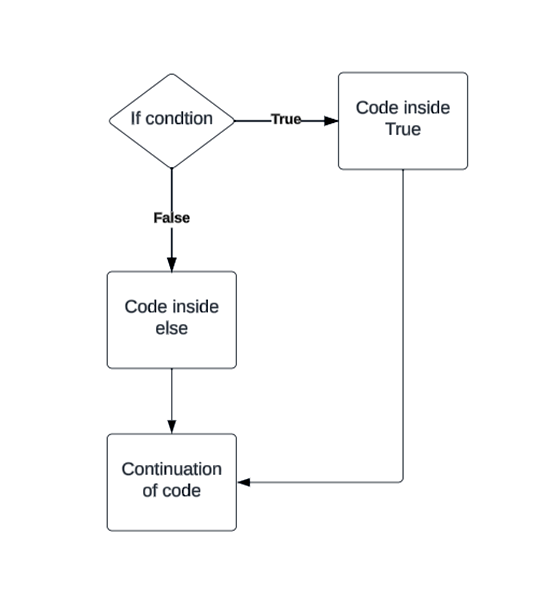
if, else
Now modify your code to look like this:
PYTHON
if rainfall:
  print("Advise user to take an umbrella")
else:
  print("Leave your umbrella at home")
Note: With boolean variables, we don’t actually have to write
== True.
Change the condition
Now change the rainfall variable to False and run the script again.
Our code now reacts differently to different input values. You can combine if, elif (else if), and else statements to control the flow of your code.
Conditional statements
- ‘if’ – Runs a block of code if a condition is true.
- ‘elif’ – Checks another condition if the previous
iforelifcondition was false. - ‘else’ – Runs a block of code if none of the previous conditions were true.
Comparison operators
We have encountered ‘==’, which is used to check for equivalence. There are other comparison operators available to us.
- > Greater than
- >= Greater than or equal to
- < Less than
- <= Less than or equal to
- == Equal to
- != Not equal to
Boolean operators
-
and: Returns
Trueonly if both conditions areTrue. -
or: Returns
Trueif at least one condition isTrue. -
not: Reverses a Boolean value, turning
TrueintoFalseandFalseintoTrue.
Next:
By combining these operators, you can create sophisticated flow control mechanisms.
For loops
In Python, a for loop is used to iterate over a sequence and perform a set of statements for each item in the sequence. Here is an example of a for loop in Python:
-
Syntax: The syntax of a for loop in Python is as follows:
-
Explanation:
- The
forkeyword is used to start the loop. -
itemis a variable that takes each value from thesequencein each iteration of the loop. -
sequenceis the collection of items over which the loop iterates. - Indentation is used to define the block of statements to be executed for each iteration of the loop.
- The
Examples: Here’s an examples of a for loop that iterates over a range of numbers and prints each number:
{: .language.python}
Here’s an examples of a for loop that iterates over a list of strings and prints each string:
For loops are commonly used in Python for iterating over sequences, performing repetitive tasks, and processing collections of data.
Keeping things clear
It is possible to put conditional statements inside conditional statements these are then referred to as ‘nested’. If your code becomes overly nested it can impact readability and maintainability. It is good practice to keep your workflow as simple as possible, this can be made easier by spending time on design and regular refactoring.
Note: Refactoring is the process of restructuring code, not to change the functionality but to improve factors like readability, maintainability, efficiency.
We’ve covered a very basic introduction to flow control in Python, but there are many more facets to explore in order to fully understand all possibilities. Please feel free to check out the link below for more information on flow control.
- Use
for variable in sequenceto process the elements of a sequence one at a time. - Don’t forget to indent.
- You can use
len(thing)to determine the length of something that contains other values. - Use
if conditionto start a conditional statement,elif conditionto provide additional tests, andelseto provide a default. - Use
==to test for equality and=for assignment. - In Python, some values are treated as false in conditions, including
\0,'',[], andNone.