
Lists and dictionaries
Last updated on 2026-03-30 | Edit this page
Estimated time: 60 minutes
Overview
Questions
- What is the difference between a list and a dictionary?
- Why do we use a list or dictionary instead of lots of separate variables?
- When is one data structure a better choice than another?
- How do I get a value out of a data structure?
- Can I get multiple values out of a data structure?
Objectives
- Understand why data structures are useful for storing multiple values.
- Create, inspect, index, and modify data structures in Python.
- Understand the difference between mutable and immutable objects.
- Understand that data structures can be nested to suit our storage needs.
Python lists
We create a list by putting values inside square brackets and separating the values with commas:
OUTPUT
odds are: [1, 3, 5, 7]We can access elements of a list using indices – numbered positions of elements in the list. These positions are numbered starting at 0, so the first element has an index of 0.
PYTHON
print('first element:', odds[0])
print('last element:', odds[3])
print('"-1" element:', odds[-1])
OUTPUT
first element: 1
last element: 7
"-1" element: 7
Yes, we can use negative numbers as indices in Python. When we do so,
the index -1 gives us the last element in the list,
-2 the second to last, and so on. Because of this,
odds[3] and odds[-1] point to the same element
here.
There is one important difference between lists and strings: we can change the values in a list, but we cannot change individual characters in a string. For example:
PYTHON
names = ['Curie', 'Darwing', 'Turing']  # typo in Darwin's name
print('names is originally:', names)
names[1] = 'Darwin'  # correct the name
print('final value of names:', names)
OUTPUT
names is originally: ['Curie', 'Darwing', 'Turing']
final value of names: ['Curie', 'Darwin', 'Turing']Ch-Ch-Ch-Ch-Changes
Mutable data (like lists and arrays) can be changed after creation, while immutable data (like strings and numbers) cannot be modified, only replaced. Modifying mutable objects in place can lead to unexpected behaviour if multiple variables reference the same data. To avoid this, you can create a copy so changes do not affect the original. In-place changes are more efficient but can make code harder to understand, so there is a trade-off between clarity and performance.
PYTHON
mild_salsa = ['peppers', 'onions', 'cilantro']
hot_salsa = mild_salsa        # <-- mild_salsa and hot_salsa point to the *same* list data in memory
hot_salsa[0] = 'hot peppers'
print('Ingredients in mild salsa:', mild_salsa)
print('Ingredients in hot salsa:', hot_salsa)
OUTPUT
Ingredients in mild salsa: ['hot peppers', 'onions', 'cilantro']
Ingredients in hot salsa: ['hot peppers', 'onions', 'cilantro']
If you want variables with mutable values to be independent, you must make a copy of the value when you assign it.
PYTHON
mild_salsa = ['peppers', 'onions', 'cilantro']
hot_salsa = mild_salsa.copy()        # <-- hot_salsa is now a copy of the original
hot_salsa[0] = 'hot peppers'
print('Ingredients in mild salsa:', mild_salsa)
print('Ingredients in hot salsa:', hot_salsa)
OUTPUT
Ingredients in mild salsa: ['peppers', 'onions', 'cilantro']
Ingredients in hot salsa: ['hot peppers','onions', 'cilantro']Nested Lists
Since a list can contain any Python variables, it can even contain other lists.
For example, you could represent the products on the shelves of a
small grocery shop as a nested list called veg:
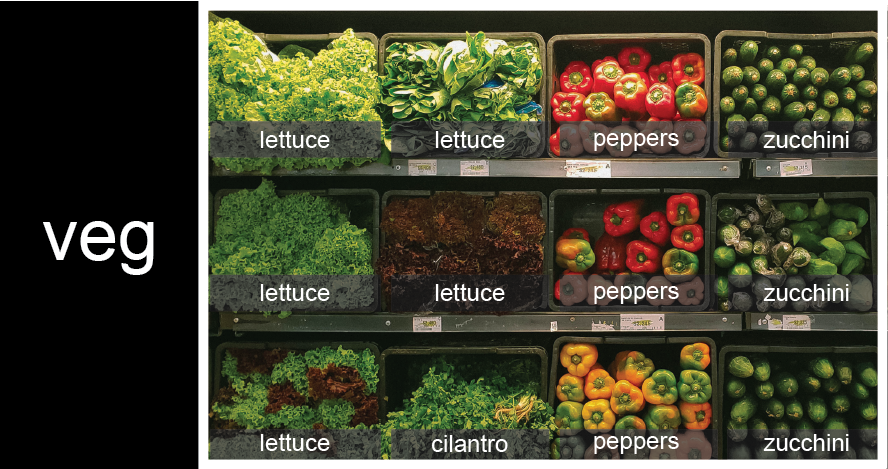
To store the contents of the shelf in a nested list, you write it this way:
PYTHON
veg = [['lettuce', 'lettuce', 'peppers', 'zucchini'],
     ['lettuce', 'lettuce', 'peppers', 'zucchini'],
     ['lettuce', 'cilantro', 'peppers', 'zucchini']]
Here are some visual examples of how indexing a list of lists
veg works. First, you can reference each row on the shelf
as a separate list. For example, veg[2] represents the
bottom row, which is a list of the baskets in that row.
![veg is now shown as a list of three rows, with veg[0] representing the top row of three baskets, veg[1] representing the second row, and veg[2] representing the bottom row.](../fig/04_groceries_veg0.png)
Index operations using the image would work like this:
OUTPUT
['lettuce', 'cilantro', 'peppers', 'zucchini']OUTPUT
['lettuce', 'lettuce', 'peppers', 'zucchini']To reference a specific basket on a specific shelf, you use two
indexes. The first index represents the row (from top to bottom) and the
second index represents the specific basket (from left to right). ![veg is now shown as a two-dimensional grid, with each basket labeled according to its index in the nested list. The first index is the row number and the second index is the basket number, so veg[1][3] represents the basket on the far right side of the second row (basket 4 on row 2): zucchini](../fig/04_groceries_veg00.png)
OUTPUT
'lettuce'OUTPUT
'peppers'There are many ways to change the contents of lists besides assigning new values to individual elements:
List slicing
If you want to take a slice from the beginning of a sequence, you can omit the first index in the range:
PYTHON
date = 'Monday 4 January 2016'
day = date[0:6]
print('Using 0 to begin range:', day)
day = date[:6]
print('Omitting beginning index:', day)
OUTPUT
Using 0 to begin range: Monday
Omitting beginning index: Monday
And similarly, you can omit the ending index in the range to take a slice to the very end of the sequence:
PYTHON
months = ['jan', 'feb', 'mar', 'apr', 'may', 'jun', 'jul', 'aug', 'sep', 'oct', 'nov', 'dec']
sond = months[8:12]
print('With known last position:', sond)
sond = months[8:len(months)]
print('Using len() to get last entry:', sond)
sond = months[8:]
print('Omitting ending index:', sond)
OUTPUT
With known last position: ['sep', 'oct', 'nov', 'dec']
Using len() to get last entry: ['sep', 'oct', 'nov', 'dec']
Omitting ending index: ['sep', 'oct', 'nov', 'dec']Slicing From the End
Use slicing to access only the last four characters of a string or entries of a list.
PYTHON
string_for_slicing = 'Observation date: 02-Feb-2013'
list_for_slicing = [['fluorine', 'F'],
                    ['chlorine', 'Cl'],
                    ['bromine', 'Br'],
                    ['iodine', 'I'],
                    ['astatine', 'At']]
OUTPUT
'2013'
[['chlorine', 'Cl'], ['bromine', 'Br'], ['iodine', 'I'], ['astatine', 'At']]
Would your solution work regardless of whether you knew beforehand the length of the string or list (e.g. if you wanted to apply the solution to a set of lists of different lengths)? If not, try to change your approach to make it more robust.
Hint: Remember that indices can be negative as well as positive
Non-Continuous Slices
So far we’ve seen how to use slicing to take single blocks of successive entries from a sequence. But what if we want to take a subset of entries that aren’t next to each other in the sequence?
You can achieve this by providing a third argument to the range within the brackets, called the step size. The example below shows how you can take every third entry in a list:
PYTHON
primes = [2, 3, 5, 7, 11, 13, 17, 19, 23, 29, 31, 37]
subset = primes[0:12:3]
print('subset', subset)
OUTPUT
subset [2, 7, 17, 29]Notice that the slice taken begins with the first entry in the range, followed by entries taken at equally-spaced intervals (the steps) thereafter. If you wanted to begin the subset with the third entry, you would need to specify that as the starting point of the sliced range:
PYTHON
primes = [2, 3, 5, 7, 11, 13, 17, 19, 23, 29, 31, 37]
subset = primes[2:12:3]
print('subset', subset)
OUTPUT
subset [5, 13, 23, 37]Use the step size argument to create a new string that contains only every other character in the string “In an octopus’s garden in the shade”. Start with creating a variable to hold the string:
What slice of beatles will produce the following output
(i.e., the first character, third character, and every other character
through the end of the string)?
OUTPUT
I notpssgre ntesaeDictionaries
- Dictionaries store key-value pairs and are accessed using keys rather than numeric positions.
- They are mutable, and keys are often strings or numbers.
- Dictionaries are created using curly braces {}.
Example of dictionary creation:
Accessing elements:
- Elements in a dictionary are accessed using square brackets [] and keys.
Example of accessing elements:
Why do we need different data structures?
We need different data structures because data does not always come in the same form.
Sometimes we want to store values in a simple ordered collection. A list is good for this. For example, a list works well for a sequence of numbers, names, or measurements where the position of each item matters.
Sometimes we want to store values with labels. A dictionary is good for this. For example, if we want to store a person’s name, age, and job, it is more useful to label each value than to rely on its position.
So, lists and dictionaries are both ways of storing multiple values, but they are designed for different purposes. A list helps us work with order, while a dictionary helps us work with meaningful labels.
We also need to consider how information is accessed when working with data at scale, particularly when thinking about how efficiently we can search for values within different data structures.
-
[value1, value2, value3, ...]creates a list, (this process does not have to be manual). - Lists can contain any Python object, including lists (i.e., list of lists).
- Lists are indexed and sliced with square brackets (e.g.,
list[0]andlist[2:9]), in the same way as strings and arrays. - Dictionaries are indexed with the key (e.g., dictionary[‘first_entry’])
- Some objects are mutable (e.g., lists).
- Some objects are immutable (e.g., strings).
- Different data structures exist because they support different ways of organising and accessing information.